Nvidia Waydroid配置maa运行明日方舟
相关项目
因为n卡的用户态驱动是闭源的, 在之前Waydroid一直不支持硬件渲染。然后今天我发现了这个项目, waydroid-nvidia,把容器内的vulkan api的调用转发到宿主机处理。
安装Waydroid
我用的是Arch Linux,所以使用了aur。 首先paru -S waydroid-nvidia-bin
然后按照项目教程初始化。
waydroid init
sudo waydroid-nvidia-setup
sudo systemctl enable --now waydroid-container.service
systemctl --user enable --now wd-venus.service
waydroid session start
这一步过后,我们应该有一个Waydroid的desktop文件了,可以直接启动。
但是目前还是玩不了明日方舟的,Waydroid是基于容器的,共用的内核,默认没有转译层。 而安卓部分软件没有x86架构支持(粥粥好像去年周年庆之前还是有x86支持的, 优化后就没了),需要安装转译工具。
首先克隆项目。git clone https://github.com/casualsnek/waydroid_script
进入后使用python创建虚拟环境并安装依赖,然后安装转译工具。
python3 -m venv venv
venv/bin/pip install -r requirements.txt
sudo venv/bin/python3 main.py install libhoudini
使用waydroid session stopwaydroid session start
下一步是安装程序,先去官网获得apk安装包文件,然后使用 waydroid app install arknights-hg-2751.apk
配置maa
使用pacman -S maa-climaa complete yourshellmaa complete fish | source
Waydroid需要waydroid adb connect
adb device -lconnection presetsetup instance optionsMaaTouch
记得在Waydroid启动的情况使用waydroid prop set persist.waydroid.width 2560waydroid prop set persist.waydroid.height 1440sudo systemctl restart waydroid-container.service
在之后只需要启动Waydroid和粥粥后maa run $tasknamewaydroid app launch com.hypergryph.arknightsmaa list
展示
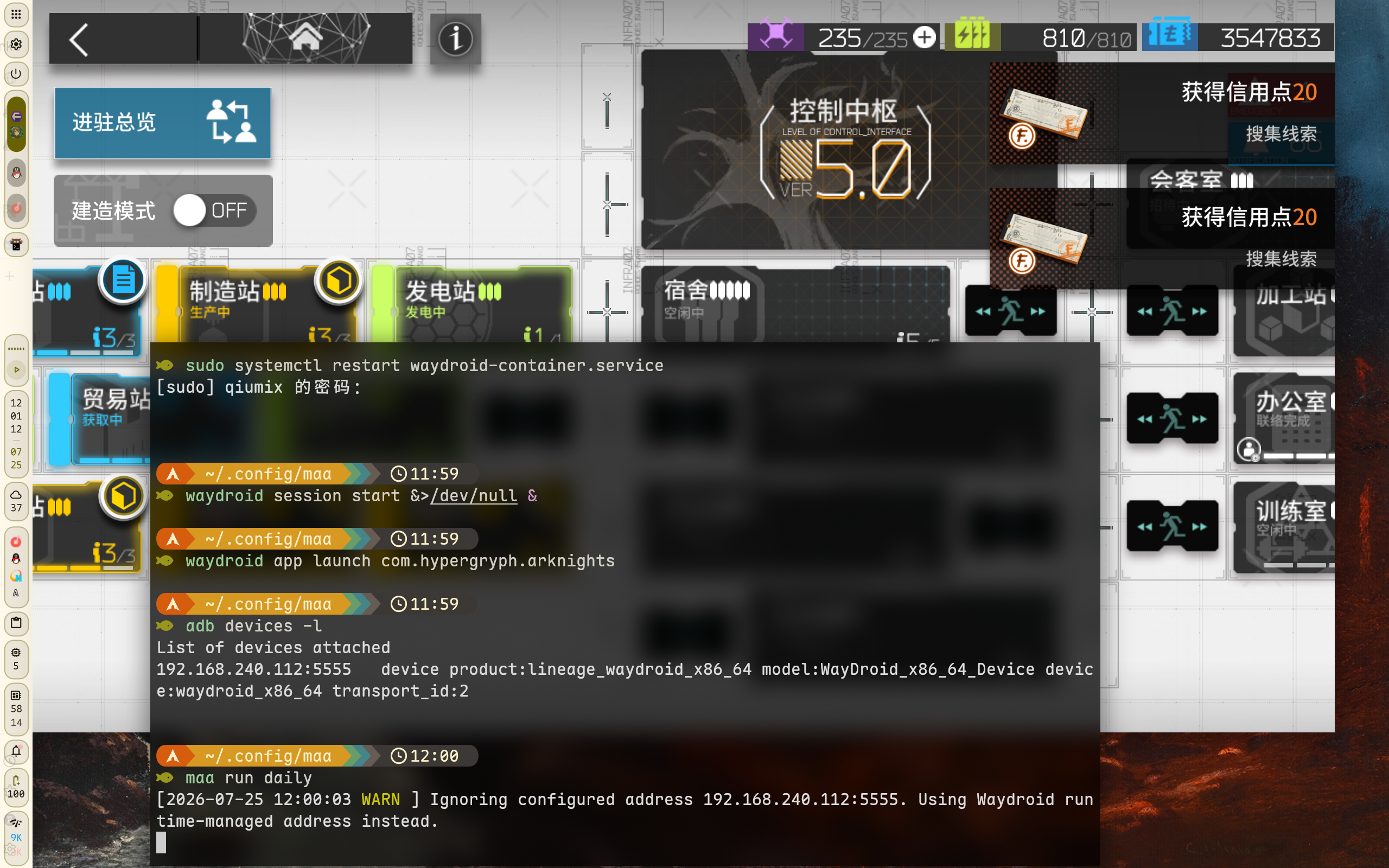
之后可以写个脚本,可以参考我这个
#!/usr/bin/env fish

# 启动 waydroid 会话
echo (set_color cyan)"[INFO] 正在启动 Waydroid 会话..."(set_color normal)
waydroid session start &>/dev/null &
sleep 10
echo (set_color green)"[ OK ] Waydroid 会话已启动"(set_color normal)

# 启动明日方舟
echo (set_color yellow)"[WARN] 正在启动 明日方舟..."(set_color normal)
waydroid app launch com.hypergryph.arknights &>/dev/null &
echo (set_color green)"[ OK ] 明日方舟 已启动"(set_color normal)

# 启动 adb 服务
echo (set_color cyan)"[INFO] 正在启动 ADB 服务..."(set_color normal)
adb devices -l &>/dev/null &
echo (set_color green)"[ OK ] ADB 服务已启动"(set_color normal)

# 连接 adb
echo (set_color cyan)"[INFO] 正在连接 ADB..."(set_color normal)
waydroid adb connect 2>&1 | bat --color=always -p --paging=never -l log
echo (set_color green)"[ OK ] ADB 已连接"(set_color normal)

# 运行 MAA 日常任务
echo (set_color yellow)"[WARN] 正在执行 MAA 日常任务..."(set_color normal)

set log_dir (maa dir log)
set timestamp (date +%Y/%m/%d/%H:%M:%S)
set log_file "$log_dir/$timestamp.log"
mkdir -p (dirname "$log_file")
maa run 1_daily -v 2>&1 | tee -a "$log_file" | bat --color=always -p --paging=never -l log

echo (set_color green)"[ OK ] MAA 日常任务完成"(set_color normal)

# 停止 waydroid 会话
echo (set_color cyan)"[INFO] 正在停止 Waydroid 会话..."(set_color normal)
waydroid session stop
echo (set_color green)"[ OK ] Waydroid 会话已停止"(set_color normal)
chmod +x赋予执行权限就好, 用fish是因为好写,比如高亮和日志那块, 你也可以换bash, 不过要手动处理不同的地方,如果没有装fish可以让ai改写。 这里还用了bat给打印的maa的日志高亮,如果没有去掉即可。
再进一步可以设置个systemd的timer定时执行, 不过我懒得搞了,这样已经足够了。
另外我写了另一个基于fzf的脚本可以交互式选择maa的任务。
#!/usr/bin/env fish
maa list \
| grep -v '\.taplo$' \
| grep -v 'run$' \
| grep -v 'tsk$' \
| sort --human-numeric-sort \
| fzf --layout=reverse \
--prompt="task> " \
--pointer="❯" \
--marker="✓" \
--input-label=" select task " \
--list-label=" task lists " \
--height "53%" \
--border=rounded \
--input-border=rounded \
--list-border=rounded \
| xargs -r maa run -v
效果大概是这样:
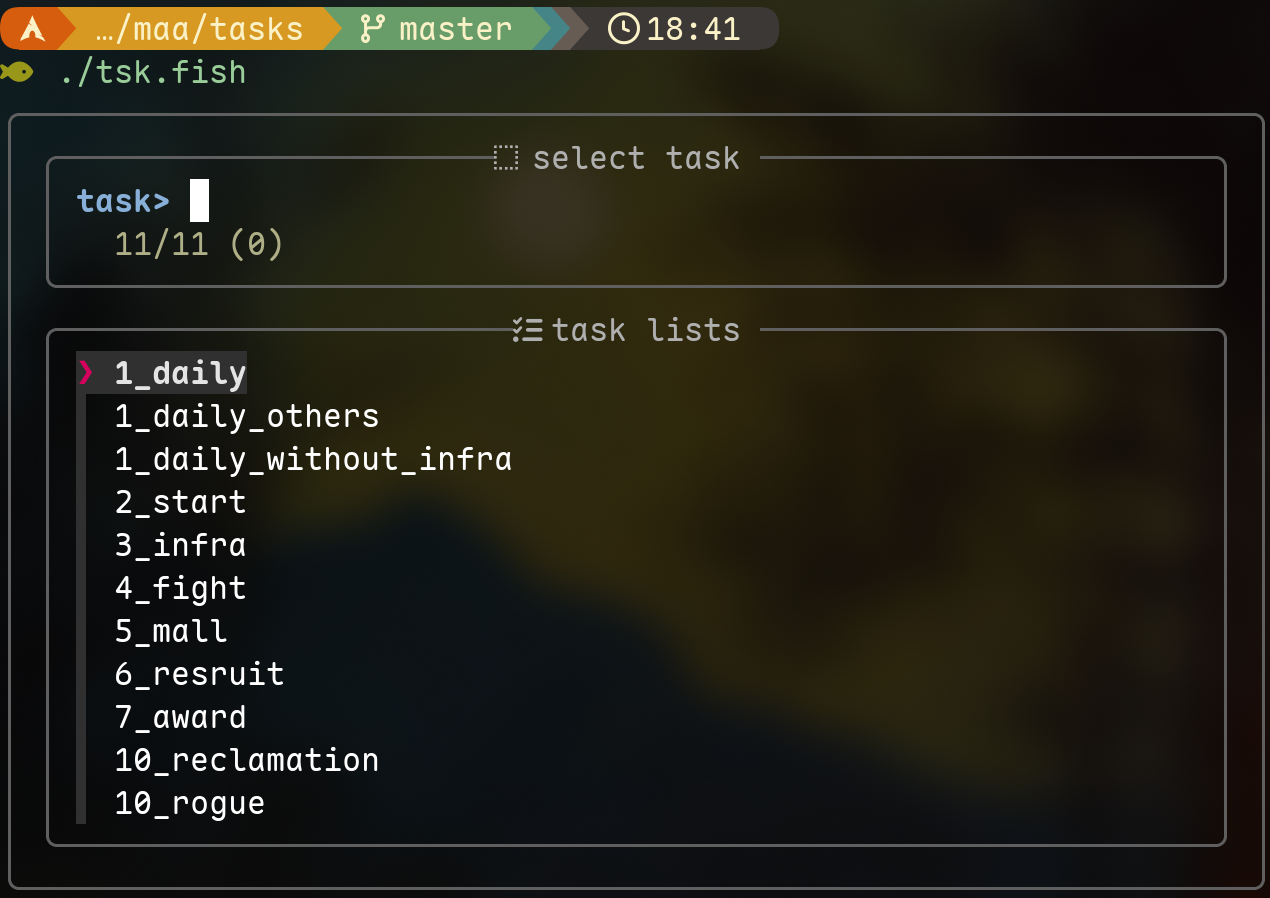
个人的task配置是这个:
#----------------------------- StartUp ----------------------------#
[[tasks]]
type = "StartUp"

[tasks.params]
client_type = "Official"
start_game_enabled = true
account_name = ""

#----------------------------- Infrast ----------------------------#
[[tasks]]
type = "Infrast"

[tasks.params]
mode = 10000
facility = ["Trade", "Reception", "Mfg", "Power", "Office", "Training", "Dorm"]
drones = "Money"
threshold = 0.5
dorm_trust_enabled = true
replenish = true
continue_training = true
filename = "baka.json"

[[tasks.variants]]
condition = { type = "Time", start = "04:00:00", end = "16:00:00" }
params = { plan_index = 0 }

[[tasks.variants]]
condition = { type = "Time", start = "16:00:01", end = "03:59:59" }
params = { plan_index = 1 }

#------------------------------ Fight -----------------------------#
[[tasks]]
type = "Fight"

[tasks.params]
expiring_medicine = 1000
series = 0

# [[tasks.variants]]
# params = { stage = "OR-7" }

# On any side story open, fight last stage
[[tasks.variants]]
condition = { type = "OnSideStory", client = "Official" }
params = { stage = "" }

# Otherwise, fight PR-A-2 on Monday, PR-B-2 on Tuesday, PR-D-2 on Wednesday,
# PR-C-2 on Thursday, AP-5 on Weekend, 1-7 for the rest
[[tasks.variants]]
condition = { type = "Weekday", weekdays = ["Mon"], timezone = "Official" }
params = { stage = "PR-A-2" }

[[tasks.variants]]
condition = { type = "Weekday", weekdays = ["Tue"], timezone = "Official" }
params = { stage = "PR-B-2" }

[[tasks.variants]]
condition = { type = "Weekday", weekdays = ["Wed"], timezone = "Official" }
params = { stage = "PR-D-2" }

[[tasks.variants]]
condition = { type = "Weekday", weekdays = ["Thu"], timezone = "Official" }
params = { stage = "PR-C-2" }

[[tasks.variants]]
condition = { type = "Weekday", weekdays = ["Sat", "Sun"], timezone = "Official" }
params = { stage = "AP-5" }

[[tasks.variants]]
params = { stage = "1-7" }

#------------------------------ Mall ------------------------------#
[[tasks]]
type = "Mall"

[tasks.params]
buy_first = ["招聘许可", "龙门币"]
blacklist = ["碳", "家具", "加急许可"]

#----------------------------- Recruit ----------------------------#
[[tasks]]
type = "Recruit"

[tasks.params]
recruitment_time = { '3' = 540, '4' = 540, '5' = 540 }
refresh = true
select = [4, 5]
confirm = [3, 4, 5]
skip_robot = false
times = 4

#------------------------------ Award -----------------------------#
[[tasks]]
type = "Award"

[tasks.params]
mail = true
orundum = true
mining = true
specialaccess = true

#--------------------------- Close Game ---------------------------#
[[tasks]]
type = "CloseDown"
params = { client_type = "Official" }